Research
Literature Reviews, Surveys, Interviews, Ethnographic Research
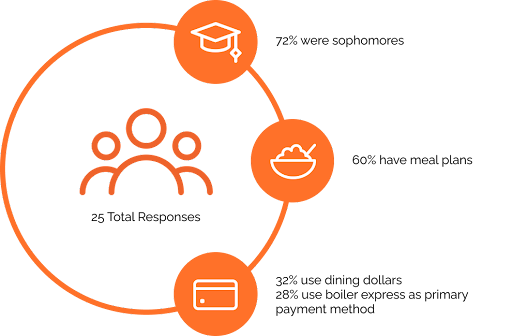
While attempting to scope down our project direction within the retail restaurant services on campus, we decided to look into designing an experience around kiosks to improve food service at Purdue. Our team thought that kiosks offered a good opportunity to keep long-term sustainability in mind, and we decided to connect our problem space with the recently reopened Purdue Memorial Union. We dove straight into research, to gain insights and understanding into the users’ experiences of Purdue’s dining spaces and general experiences on using kiosks/mobile ordering.
Takeaways
- Literature Reviews
- Kiosks offer convenient self-service ordering, eliminating the need for human interaction. Users can easily explore the menu, customize their orders, and view accurate images.
- Kiosks provide accessibility and control. They offer nutritional information, aiding informed choices for dietary restrictions. Users with language barriers find it easier to order accurately. Kiosks ensure complete order control and customization.
- Comfortable waiting areas improve the customer experience. They enhance comfort, patience, and reduce congestion, making the wait more pleasant.
- Kiosks streamline operations, improving efficiency. They expedite card scanning, reducing wait times, especially during busy meal swipe periods.
- Implementing kiosks has been shown to boost sales, decrease costs, and promote long-term sustainability. - Surveys
- 92% of our respondents said they have struggled with food wait times on campus.
- The information that restaurants provide (e.g. meal swipe times/meals, closed, business hours, etc.) is lacking.
- Mobile ordering made food easier to get and more accessible.
- Notable experiences of participants were that kiosks are fast to use, decrease wait times, and improve order accuracy. - Interviews
- Participants expressed difficulty reading small or unclear menus.
- Lots of information is lacking from menus such as nutritional facts or clear labels for those with dietary restrictions.
- Users are not able to differentiate which restaurants offer which payment methods, like meal swipes, and at what time.
- Restaurants are often overloaded with customers, which overwhelms employees and increases wait times. - Ethnographic Research
We learned about certain pain points we wanted to tackle, like crowding and difficulty in menus and orders. This allowed us to begin designing iterations to aid the restaurant experience at the PMU.
Design
Sketches, Journey Map, Realigning the Scope, Prototypes, Iteration, Testing
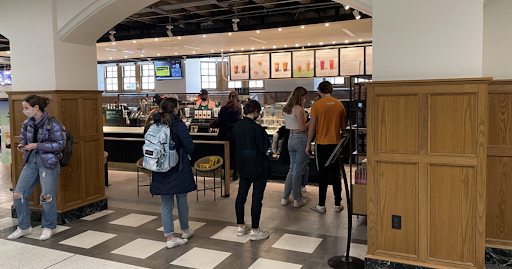
After observing the PMU's dining areas and researching the functionality of kiosks, we combined all of our main takeaways and started the brainstorming process. Some of the specific pain points we wanted to focus on when starting the ideation process was reducing long lines, making menu information easily accessible, facilitating better communication between stores and students, and improving waiting spaces.
Sketches
.png)
Space
How do people interact with the space in the PMU? Most people are trying to get food and leave, we thought about how we could better the flow and waiting areas around these restaurants.
How do people interact with the space in the PMU? Most people are trying to get food and leave, we thought about how we could better the flow and waiting areas around these restaurants.
.png)
Ordering
How would mobile ordering or kiosk ordering look? We realized here that we need to consider the accessibility of the device, as well as including enough information, but not too much as this causes a longer ordering process.
How would mobile ordering or kiosk ordering look? We realized here that we need to consider the accessibility of the device, as well as including enough information, but not too much as this causes a longer ordering process.
.png)
Pickup
How might people pick up their food? This locker idea correlated people with numbered lockers and helped them get their food faster without names, or waiting on a human interaction. This might help people receive their food in an easier manner, but could also cause other problems.
How might people pick up their food? This locker idea correlated people with numbered lockers and helped them get their food faster without names, or waiting on a human interaction. This might help people receive their food in an easier manner, but could also cause other problems.
Journey Map & Realigning the Scope
Creating this map was very beneficial to our team as it helped us narrow down which part of the experience we wanted to focus on. Although we intended on following our sponsors’ guidance by considering all parts of the dining experience, we chose to realign our scope from just kiosks, to the whole holistic experience. With this newfound focus, we were able to create more specific ideas and sketches to create higher fidelity prototypes.

Lo-Fi Prototypes
After realigning our scope, we needed to find a way to visualize all of the research we had spent the semester on. We had done multiple rounds of sketching and analysis throughout the research process, and we had enough context and insights to design a solution. Our goal was to come up with one solidified design that we could test and iterate on. We split our low-fidelity prototypes into 4 stages: preorder, order, checkout, and pickup.
Preorder
Users browse restaurants, check wait times, and meal swipe availability. Meal swipes are part of Purdue's meal plan, providing preloaded funds for weekly spending.
Users browse restaurants, check wait times, and meal swipe availability. Meal swipes are part of Purdue's meal plan, providing preloaded funds for weekly spending.
Order
Mockups display full restaurant menus in the PMU. Users expressed a desire for extensive menu information, including dietary options, nutrition facts, pictures, and descriptions. Users can click on items for more details.
Mockups display full restaurant menus in the PMU. Users expressed a desire for extensive menu information, including dietary options, nutrition facts, pictures, and descriptions. Users can click on items for more details.
Checkout
Users review their cart, distinguishing regular payment items from those available with meal swipes. Users select their payment method and confirm the transaction.
Users review their cart, distinguishing regular payment items from those available with meal swipes. Users select their payment method and confirm the transaction.
Pickup
A locker system ensures food protection and efficient pickup. Users receive notifications indicating the locker location and successfully operate their assigned locker via their mobile phone.
A locker system ensures food protection and efficient pickup. Users receive notifications indicating the locker location and successfully operate their assigned locker via their mobile phone.
Iteration & Testing
We established a testing protocol to evaluate our low-fidelity prototypes and identify areas for improvement. We Conducted one-on-one usability testing sessions, where we received feedback that emphasized the need to enhance the physical dining space interactions in our prototypes. We also recognized that increasing the fidelity of our mockups would address issues related to content readability and comprehension. These insights guided us towards developing mid-fidelity prototypes.
Mid-Fi Prototypes
Building upon the insights gained from our testing, we iterated on our lo-fi prototypes. We developed mid-fidelity designs that featured an enhanced ordering and pickup process. Our focus was on improving the overall dining experience, which led us to incorporate additional screens, including a physical receipt feature to enable users to track food wait times. These refinements aimed to create a more comprehensive and satisfying user journey.
More Iteration & Testing
Following the completion of our mid-fidelity prototypes, we proceeded with another round of usability testing to ensure a seamless and intuitive user experience. Participants expressed confusion regarding locker access for food pickup, faced challenges with text readability, encountered confusion with profile information, and struggled with understanding meal swipe hours. Incorporating this feedback, we refined our final design to cater to both students and restaurant employees, aiming for more sophisticated and inclusive designs.
.png)